Recently I have been working on a notebook with NVidia Quadro FX 1700M. Windows 7 enterprise 32-bit SP1, with Visual Studio 2005 and 2008. 2 1920x1200 LCD monitors. The Visual Studio 2008 environment gave problems: I could not select certain vertical scrollbars or open dropdwon boxes , particularly in the Source Control Explorer window for TFS. Which made it impossible for me to recent versions of projects from the source control system. I noticed that the vertical scrollbar in the source control explorer window could be manipulated when I moved the cursor approx 2 cm to the right of the scrollbar. when I hovered 2 cm to the right the scrollbar changed color and by clicking I could then moved it up or down. But I could not click the button bar on top of the window, almost as if it all buttons were disabled.
On this computer I als used SQL Server Management studio. In this window I noticed that when dragging the right hand edge of the Object explorer window, a ghost edge was displayd 2 cm to the left of my cursor, althought I could click and drag on the exact edge position.
Diagnose
These 2 phenomena made it look like a display driver problem. Since the Nvidia drivers were the certified Windows drivers I was reluctant to update them by downloading newer drivers from the Nvidia site. By comparing with the screens from a collegue with similar hardware, I noticed my Icons and windows were taller than his.
Solution
- In Windows 7 rightclick on the desktop and select 'screen resolution'
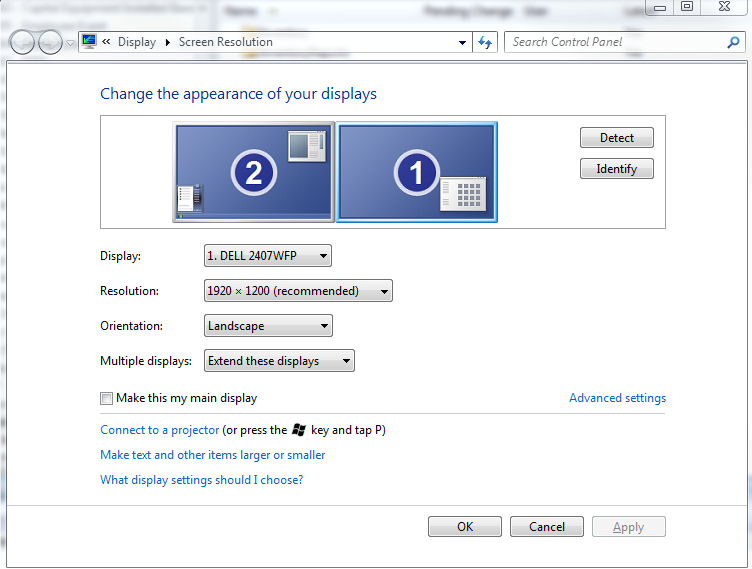
- Click on 'make text and other items larger or smaller

- The setting was 125% - Select 'Smaller 100%' (then it dos not scale)
- click on apply
- Log out and login - Problem is solved !
